Connect your Shopify store to Adapt to analyze orders, products, customers, inventory, and revenue
Adapt can connect to Shopify two ways. Pick whichever fits your store:
Custom OAuth app (recommended) — you create a Shopify app, save its Client
ID and Client Secret in Adapt, and authorize over OAuth. Adapt receives a
long-lived offline token, so there is nothing to rotate day to day. This is the
best option for stores set up in the Shopify Dev Dashboard.
API key — you paste an Admin API access token (shpat_) from a custom app.
Simplest if your store already has an admin-created custom app with a token.
Both are read-only and use the same Shopify scopes. Choose the matching Shopify
tile in Adapt’s integration catalog for the method you use.
These cover Adapt’s Shopify use cases — revenue and ROAS reporting, customer
retention, and inventory management. These configured scopes are exactly what
the store grants when the app is installed, so set everything you need here
before installing. Request only what your use case needs.
4
Add Adapt's redirect URL
Still in the Access section, add this exact value under Redirect URLs:
Shopify only redirects back to URLs registered here, so it must match
exactly.
5
Set the app to custom distribution
On the app’s Overview page, in the Distribution panel, click Select
distribution method. Choose Custom distribution, click Select, then
confirm Select custom distribution in the dialog (this can’t be undone).
Enter your Store domain (for example my-store.myshopify.com), leave
Allow multi-store install for one Plus organization as needed, and click
Generate link. Choosing custom distribution automatically grants the app
access to protected customer data (required for read_orders and
read_customers), so there is no separate approval to request.
6
Release a new version
Release a new version of the app so the scopes and distribution settings
become active.
7
Install the app on your store
Copy the generated Install link and open it to install the app on your
store. You can return to it anytime from the Distribution panel, which now
shows Manage custom install link (or use Install app in the
Installs panel). Installing is what grants the app the scopes and
protected customer data you configured. If you change scopes later, release a
new version and reinstall, then reconnect in Adapt.
8
Copy the Client ID and Client Secret
Open the app’s Settings and copy the Client ID and Client
secret. See Shopify’s About client credentials.
Store the secret securely — you will paste it into Adapt next.
read_orders and read_customers return customer PII (protected customer
data); custom distribution grants this automatically. Accessing PII also
requires your store to be on a paid Shopify plan. Adapt calls the GraphQL Admin
API (Shopify is phasing out REST access to protected data).
Save your app credentials in Adapt
You do this once per organization. Any org member can save or rotate these shared
credentials, and every member can then connect their store using them.
1
Open Integrations
In Adapt, go to Settings > Integrations.
2
Find Shopify
Search for Shopify and select the custom OAuth app option from the
catalog.
3
Enter your app credentials
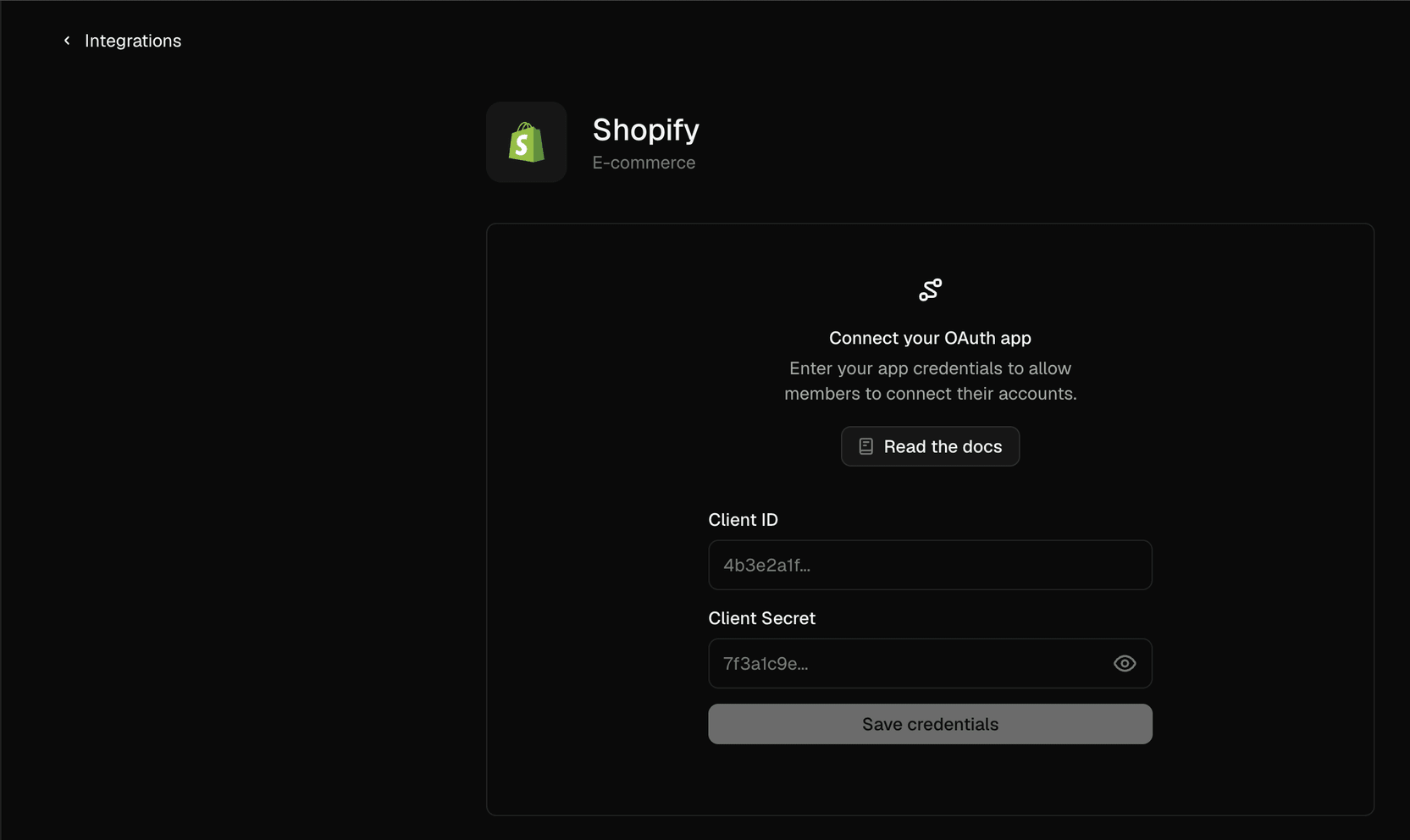
On the Connect your OAuth app setup screen, enter your Client ID and
Client Secret, then click Save credentials.
Adapt encrypts the Client Secret at rest with AES-256 and never shows it again.
To rotate it later, use Update credentials on the Shopify integration and
paste a new secret.
Connect your store
1
Start the connection
With credentials saved, click Connect on the Shopify integration.
2
Enter your store subdomain
Enter just your store subdomain — for example my-store for
my-store.myshopify.com — and a name for the connection, then click
Connect.
3
Approve access on Shopify
You are redirected to Shopify to review the requested scopes. Approve the
request, and Shopify sends you back to Adapt with the connection in place.
4
Test the connection
Ask Adapt to list your most recent orders.
Connect with an API key
Use this if your store already has (or can create) an admin custom app with an
Admin API access token.
Shopify is retiring new custom app creation from the store admin. The Develop
apps flow remains available on many stores where custom app development is
enabled and is what produces a long-lived shpat_ token. If you can’t create a
custom app this way, use the custom OAuth app method above instead.
Set up credentials
1
Open the Develop apps area
In your Shopify admin, go to Settings > Apps and sales channels > Develop
apps.
2
Enable custom app development
If prompted, click Allow custom app development and confirm. This is a
one-time action per store.
3
Create the app
Click Create an app, give it a name (for example, “Adapt”), select an app
developer, and click Create app.
4
Configure Admin API scopes
Open the Configuration tab, then under Admin API integration click
Configure. Select the read scopes you need — for example read_orders,
read_products, read_customers, read_inventory, read_locations,
read_analytics — then click Save.
5
Install the app
Open the API credentials tab, click Install app, then confirm.
Installing generates the Admin API access token.
6
Reveal and copy the access token
Under Admin API access token, click Reveal token once and copy the
value. It starts with shpat_. Shopify shows this token only once, so store
it securely.
7
Note your store domain
Your store domain is the .myshopify.com address for your shop, for example
my-store.myshopify.com.
Connect to Adapt
1
Open Integrations
In Adapt, go to Settings > Integrations.
2
Find Shopify
Search for Shopify and select the API key option from the catalog.
3
Start the connection
Click Connect to open the connection form.
4
Add your credentials
Enter the values you gathered above, then click Add connection:
Secret Name
Value
SHOPIFY_STORE_DOMAIN
Your store domain (e.g. my-store.myshopify.com)
SHOPIFY_ADMIN_ACCESS_TOKEN
Your Admin API access token
You can rename the connection and choose whether it is shared with your
organization or kept personal to you.
5
Test the connection
Ask Adapt to list your most recent orders.
Security
Credentials and access tokens are encrypted at rest with AES-256
Adapt requests read-only scopes; grant only what your use case needs
Revoke access anytime by uninstalling the app from your Shopify store, or by removing the credentials in Adapt
The Client Secret (OAuth) and Admin API access token (API key) are shown only once; store them securely
Never share your credentials or commit them to source control
Capabilities
Adapt can read and analyze your Shopify store data through the Admin API. Ask
questions about sales performance, catalog, customers, and inventory in natural
language.
Examples
Which channel is driving efficient revenue this week, and where am I wasting spend?
Who bought once and never came back, and who used to buy regularly but went quiet?
Which SKUs are about to stock out across channels?
Show total revenue by month for the last year
{"docsConfig":{"theme":"mint","$schema":"https://mintlify.com/docs.json","name":"Adapt Documentation","colors":{"primary":"#262624","light":"#262624","dark":"#262624"},"logo":{"light":"https://mintcdn.com/adapt-fa4ae803/BAmAjHyMB2A5zn60/logo/light.svg?fit=max\u0026auto=format\u0026n=BAmAjHyMB2A5zn60\u0026q=85\u0026s=413f5deceecbfa040e3ec50b8b539669","dark":"https://mintcdn.com/adapt-fa4ae803/BAmAjHyMB2A5zn60/logo/dark.svg?fit=max\u0026auto=format\u0026n=BAmAjHyMB2A5zn60\u0026q=85\u0026s=224db514b49034910a16eba32cbebe6f","href":"https://adapt.com"},"favicon":"https://mintcdn.com/adapt-fa4ae803/mGvpUMlZVstS99q4/favicon.svg?fit=max\u0026auto=format\u0026n=mGvpUMlZVstS99q4\u0026q=85\u0026s=8128b36ec03c3f40b36fa6d7141c8613","appearance":{"default":"light","strict":true},"background":{"color":{"light":"#F7F7F6","dark":"#F7F7F6"}},"navbar":{"links":[{"href":"/","label":"Docs"},{"href":"https://adapt.com/support","label":"Support"}],"primary":{"type":"button","label":"Get a demo","href":"https://adapt.com/request-demo"}},"footer":{"socials":{"linkedin":"https://linkedin.com/company/adaptcom","x":"https://x.com/adapt"}},"seo":{"metatags":{"robots":"noindex"}},"fonts":{"heading":{"family":"GT Era","weight":450,"source":"https://adapt.com/docs/fonts/GT-Era-VF.woff2","format":"woff2"},"body":{"family":"GT Era","weight":400,"source":"https://adapt.com/docs/fonts/GT-Era-VF.woff2","format":"woff2"}},"integrations":{"ga4":{"measurementId":"G-SXZJT629F2"},"posthog":{"apiKey":"phc_TQotGLCnREtZK5iLtL0KFUyGB3hSEpBZoXTtXVtYaOr","apiHost":"https://us.i.posthog.com"}},"contextual":{"options":["copy","view","chatgpt","claude","perplexity","mcp","cursor","vscode"],"display":"header"},"styling":{"latex":true},"navigation":{"pages":[]}},"deployment":{"deploymentMetadataValue":{"subdomain":"adapt-fa4ae803","hasAudioNarration":false,"actualSubdomain":"adapt-fa4ae803","customDomains":["v1-docs.adapt.com"],"gitSource":{"type":"github","owner":"adapt","repo":"docs","deployBranch":"main","contentDirectory":"","isPrivate":true,"mountPath":"","label":""},"entitlements":{"AI_CHAT":{"status":"ENABLED"},"WEB_MCP":{"status":"ENABLED"},"NARRATION":{"status":"ENABLED"}},"buildId":"6af7d691d008e76d1045c838","clientVersion":"0.0.4142","searchFilterCounts":[{"language":"default","tag":"Integrations","count":61},{"language":"default","tag":"Documentation","count":18},{"language":"default","tag":"Use Cases","count":12},{"language":"default","tag":"Core Features","count":8},{"language":"default","tag":"Security \u0026 Privacy","count":8},{"language":"default","tag":"CRM \u0026 Sales","count":7},{"language":"default","tag":"By Role","count":7},{"language":"default","tag":"Marketing \u0026 SEO","count":6},{"language":"default","tag":"Platform Access","count":6},{"language":"default","tag":"Databases","count":5}]},"assistantConfig":{},"basePath":"/docs","hasChatPermissions":true,"hasWebMcpPermissions":true,"toggles":[{"name":"kill-isr","enabled":true,"variant":{"name":"disabled","enabled":false,"feature_enabled":true},"impressionData":false},{"name":"custom-rbac-roles","enabled":true,"variant":{"name":"disabled","enabled":false,"feature_enabled":true},"impressionData":false},{"name":"agent-mintlify-slack","enabled":true,"variant":{"name":"disabled","enabled":false,"feature_enabled":true},"impressionData":false},{"name":"agent-integrations-settings","enabled":true,"variant":{"name":"disabled","enabled":false,"feature_enabled":true},"impressionData":false},{"name":"rbac-expansion","enabled":true,"variant":{"name":"disabled","enabled":false,"feature_enabled":true},"impressionData":false},{"name":"automations-pr-grouping","enabled":true,"variant":{"name":"disabled","enabled":false,"feature_enabled":true},"impressionData":false},{"name":"custom-prefix","enabled":true,"variant":{"name":"disabled","enabled":false,"feature_enabled":true},"impressionData":false},{"name":"analytics-v7","enabled":true,"variant":{"name":"disabled","enabled":false,"feature_enabled":true},"impressionData":false},{"name":"user-flows-analytics","enabled":true,"variant":{"name":"disabled","enabled":false,"feature_enabled":true},"impressionData":false},{"name":"no-publish-flow","enabled":true,"variant":{"name":"disabled","enabled":false,"feature_enabled":true},"impressionData":false},{"name":"workos-onboarding","enabled":true,"variant":{"name":"disabled","enabled":false,"feature_enabled":true},"impressionData":false},{"name":"snapshot-serving-live","enabled":true,"variant":{"name":"disabled","enabled":false,"feature_enabled":true},"impressionData":false},{"name":"stripTemperatureMiddleware","enabled":true,"variant":{"name":"disabled","enabled":false,"feature_enabled":true},"impressionData":false},{"name":"support-platform-pylon-zendesk","enabled":true,"variant":{"name":"disabled","enabled":false,"feature_enabled":true},"impressionData":false},{"name":"snapshot-serving","enabled":true,"variant":{"name":"disabled","enabled":false,"feature_enabled":true},"impressionData":false},{"name":"instant-rollback","enabled":true,"variant":{"name":"disabled","enabled":false,"feature_enabled":true},"impressionData":false},{"name":"granular-notifications-server","enabled":true,"variant":{"name":"disabled","enabled":false,"feature_enabled":true},"impressionData":false},{"name":"granular-notifications","enabled":true,"variant":{"name":"disabled","enabled":false,"feature_enabled":true},"impressionData":false},{"name":"automations-fable","enabled":true,"variant":{"name":"disabled","enabled":false,"feature_enabled":true},"impressionData":false},{"name":"fixed-ai-action-pricing","enabled":true,"variant":{"name":"disabled","enabled":false,"feature_enabled":true},"impressionData":false},{"name":"automation-resolve-merge-conflict","enabled":true,"variant":{"name":"disabled","enabled":false,"feature_enabled":true},"impressionData":false},{"name":"scoped-publishing","enabled":true,"variant":{"name":"disabled","enabled":false,"feature_enabled":true},"impressionData":false},{"name":"mintql","enabled":true,"variant":{"name":"disabled","enabled":false,"feature_enabled":true},"impressionData":false},{"name":"page-level-analytics","enabled":true,"variant":{"name":"disabled","enabled":false,"feature_enabled":true},"impressionData":false},{"name":"editor-version-history-v2","enabled":true,"variant":{"name":"disabled","enabled":false,"feature_enabled":true},"impressionData":false},{"name":"billing-page-v2","enabled":true,"variant":{"name":"disabled","enabled":false,"feature_enabled":true},"impressionData":false},{"name":"full-page-search","enabled":true,"variant":{"name":"disabled","enabled":false,"feature_enabled":true},"impressionData":false},{"name":"workspace-projects","enabled":true,"variant":{"name":"disabled","enabled":false,"feature_enabled":true},"impressionData":false},{"name":"assistant-v5","enabled":true,"variant":{"name":"disabled","enabled":false,"feature_enabled":true},"impressionData":false},{"name":"fork-pr-previews","enabled":true,"variant":{"name":"disabled","enabled":false,"feature_enabled":true},"impressionData":false},{"name":"revalidation-jwt","enabled":true,"variant":{"name":"disabled","enabled":false,"feature_enabled":true},"impressionData":false},{"name":"workos-sso-scim","enabled":true,"variant":{"name":"disabled","enabled":false,"feature_enabled":true},"impressionData":false},{"name":"hobby-abuse-scan","enabled":true,"variant":{"name":"disabled","enabled":false,"feature_enabled":true},"impressionData":false},{"name":"dashboard-inbox","enabled":true,"variant":{"name":"disabled","enabled":false,"feature_enabled":true},"impressionData":false},{"name":"workos-signup","enabled":true,"variant":{"name":"disabled","enabled":false,"feature_enabled":true},"impressionData":false},{"name":"turbopuffer-dual-write","enabled":true,"variant":{"name":"disabled","enabled":false,"feature_enabled":true},"impressionData":false},{"name":"workos-enabled","enabled":true,"variant":{"name":"disabled","enabled":false,"feature_enabled":true},"impressionData":false},{"name":"approve-review-flow","enabled":true,"variant":{"name":"disabled","enabled":false,"feature_enabled":true},"impressionData":false},{"name":"editor-metadata","enabled":true,"variant":{"name":"disabled","enabled":false,"feature_enabled":true},"impressionData":false},{"name":"sso-setup-deadline-banner","enabled":true,"variant":{"name":"disabled","enabled":false,"feature_enabled":true},"impressionData":false},{"name":"turbopuffer-serve","enabled":true,"variant":{"name":"disabled","enabled":false,"feature_enabled":true},"impressionData":false},{"name":"live-agents","enabled":true,"variant":{"name":"disabled","enabled":false,"feature_enabled":true},"impressionData":false},{"name":"llms-txt-v2","enabled":true,"variant":{"name":"disabled","enabled":false,"feature_enabled":true},"impressionData":false}],"googleFontsInlined":false},"customCss":[{"filePath":"custom.css","content":"@font-face{font-family:\"GT Era\";src:url(\"https://adapt.com/docs/fonts/GT-Era-VF.woff2\") format(\"woff2\");font-weight:100 900;font-style:normal;font-display:swap}@font-face{font-family:\"GT Mechanik Mono\";src:url(\"https://adapt.com/docs/fonts/GT-Mechanik-Mono-Regular.woff2\") format(\"woff2\");font-weight:400;font-display:swap}@font-face{font-family:\"GT Mechanik Mono\";src:url(\"https://adapt.com/docs/fonts/GT-Mechanik-Mono-Medium.woff2\") format(\"woff2\");font-weight:500;font-display:swap}@font-face{font-family:\"GT Mechanik Mono\";src:url(\"https://adapt.com/docs/fonts/GT-Mechanik-Mono-Bold.woff2\") format(\"woff2\");font-weight:700;font-display:swap}body{font-variation-settings:\"slnt\" 0}code,pre,kbd,pre code{font-family:\"GT Mechanik Mono\", ui-monospace, \"SF Mono\", Menlo, monospace}#navbar nav[aria-label=\"Main\"]>ul>.navbar-link:first-child{position:fixed;top:1.25rem;left:max(5.5rem, calc((100vw - 90rem) / 2 + 5.5rem));z-index:30}#navbar nav[aria-label=\"Main\"]>ul>.navbar-link:first-child>a{gap:0.75rem;color:#262624;font-size:1rem;font-weight:500;line-height:1.5rem}#navbar nav[aria-label=\"Main\"]>ul>.navbar-link:first-child>a::before{color:#6f6e68;content:\"/\";font-size:1.25rem;font-weight:500}.dark #navbar nav[aria-label=\"Main\"]>ul>.navbar-link:first-child>a{color:#f2f1ed}@media (max-width: 1023px){#navbar div:has(>nav[aria-label=\"Main\"]){display:block!important;flex:0 0 auto;margin-left:0}#navbar nav[aria-label=\"Main\"]>ul>li{display:none!important}#navbar nav[aria-label=\"Main\"]>ul>.navbar-link:first-child{display:block!important;top:1.25rem;left:3.75rem}}"}],"page":{"pagePath":"integrations/shopify","slug":"/integrations/shopify","pageMetadata":{"title":"Shopify","description":"Connect your Shopify store to Adapt to analyze orders, products, customers, inventory, and revenue","href":"/integrations/shopify"},"description":{"compiledSource":"\"use strict\";\nconst {jsx: _jsx} = arguments[0];\nconst {useMDXComponents: _provideComponents} = arguments[0];\nfunction _createMdxContent(props) {\n const _components = {\n p: \"p\",\n ..._provideComponents(),\n ...props.components\n };\n return _jsx(_components.p, {\n children: \"Connect your Shopify store to Adapt to analyze orders, products, customers, inventory, and revenue\"\n });\n}\nfunction MDXContent(props = {}) {\n const {wrapper: MDXLayout} = {\n ..._provideComponents(),\n ...props.components\n };\n return MDXLayout ? _jsx(MDXLayout, {\n ...props,\n children: _jsx(_createMdxContent, {\n ...props\n })\n }) : _createMdxContent(props);\n}\nreturn {\n default: MDXContent\n};\n","frontmatter":{},"scope":{}},"pageType":"default","mdx":{"mdxSource":{"compiledSource":"\"use strict\";const{Fragment:_Fragment,jsx:_jsx,jsxs:_jsxs}=arguments[0];const{useMDXComponents:_provideComponents}=arguments[0];function _createMdxContent(props){const _components={a:`a`,code:`code`,img:`img`,li:`li`,p:`p`,pre:`pre`,span:`span`,strong:`strong`,tbody:`tbody`,td:`td`,th:`th`,thead:`thead`,tr:`tr`,ul:`ul`,..._provideComponents(),...props.components},{CodeBlock,Heading,Note,Step,Steps,Table}=_components;if(!CodeBlock)_missingMdxReference(`CodeBlock`,true);if(!Heading)_missingMdxReference(`Heading`,true);if(!Note)_missingMdxReference(`Note`,true);if(!Step)_missingMdxReference(`Step`,true);if(!Steps)_missingMdxReference(`Steps`,true);if(!Table)_missingMdxReference(`Table`,true);return _jsxs(_Fragment,{children:[_jsx(_components.p,{children:`Adapt can connect to Shopify two ways. Pick whichever fits your store:`}),`\n`,_jsxs(_components.ul,{children:[`\n`,_jsxs(_components.li,{children:[_jsxs(_components.strong,{children:[_jsx(_components.a,{href:`#connect-with-a-custom-oauth-app`,children:`Custom OAuth app`}),` (recommended)`]}),` — you create a Shopify app, save its Client\nID and Client Secret in Adapt, and authorize over OAuth. Adapt receives a\nlong-lived offline token, so there is nothing to rotate day to day. This is the\nbest option for stores set up in the Shopify Dev Dashboard.`]}),`\n`,_jsxs(_components.li,{children:[_jsx(_components.strong,{children:_jsx(_components.a,{href:`#connect-with-an-api-key`,children:`API key`})}),` — you paste an Admin API access token (`,_jsx(_components.code,{children:`shpat_`}),`) from a custom app.\nSimplest if your store already has an admin-created custom app with a token.`]}),`\n`]}),`\n`,_jsxs(_components.p,{children:[`Both are read-only and use the same Shopify scopes. Choose the matching `,_jsx(_components.strong,{children:`Shopify`}),`\ntile in Adapt’s integration catalog for the method you use.`]}),`\n`,_jsx(Heading,{level:`2`,id:`connect-with-a-custom-oauth-app`,children:`Connect with a custom OAuth app`}),`\n`,_jsx(Heading,{level:`3`,id:`create-a-shopify-oauth-app`,children:`Create a Shopify OAuth app`}),`\n`,_jsxs(_components.p,{children:[`Create the app in the `,_jsx(_components.a,{href:`https://shopify.dev/docs/apps/build/dev-dashboard/create-apps-using-dev-dashboard`,children:`Shopify Dev Dashboard`}),`.\nAdapt uses the standard `,_jsx(_components.a,{href:`https://shopify.dev/docs/apps/build/authentication-authorization/access-tokens/authorization-code-grant`,children:`authorization code grant`}),`.`]}),`\n`,_jsxs(Steps,{children:[_jsx(Step,{title:`Open the Dev Dashboard`,children:_jsxs(_components.p,{children:[`Go to `,_jsx(_components.a,{href:`https://dev.shopify.com/dashboard`,children:`dev.shopify.com/dashboard`}),` and\nsign in, or create an account if you do not have one.`]})}),_jsx(Step,{title:`Create the app`,children:_jsxs(_components.p,{children:[`Click `,_jsx(_components.strong,{children:`Create app`}),`, then in the `,_jsx(_components.strong,{children:`Start from Dev Dashboard`}),` card set an\n`,_jsx(_components.strong,{children:`App name`}),` (for example, “Adapt”) and create the app.`]})}),_jsxs(Step,{title:`Set the access scopes`,children:[_jsxs(_components.p,{children:[`Open the app’s `,_jsx(_components.strong,{children:`Access`}),` section and set the `,_jsx(_components.strong,{children:`Scopes`}),` field to the read\nscopes Adapt uses:`]}),_jsx(CodeBlock,{numberOfLines:`2`,language:`text`,children:_jsx(_components.pre,{className:`shiki shiki-themes github-light-default dark-plus`,style:{backgroundColor:`#ffffff`,\"--shiki-dark-bg\":`#0B0C0E`,color:`#1f2328`,\"--shiki-dark\":`#D4D4D4`},language:`text`,children:_jsxs(_components.code,{language:`text`,numberOfLines:`2`,children:[_jsx(_components.span,{className:`line`,children:_jsx(_components.span,{children:`read_orders, read_products, read_customers, read_inventory, read_locations, read_analytics`})}),`\n`,_jsx(_components.span,{className:`line`,children:_jsx(_components.span,{})})]})})}),_jsx(_components.p,{children:`These cover Adapt’s Shopify use cases — revenue and ROAS reporting, customer\nretention, and inventory management. These configured scopes are exactly what\nthe store grants when the app is installed, so set everything you need here\nbefore installing. Request only what your use case needs.`})]}),_jsxs(Step,{title:`Add Adapt's redirect URL`,children:[_jsxs(_components.p,{children:[`Still in the `,_jsx(_components.strong,{children:`Access`}),` section, add this exact value under `,_jsx(_components.strong,{children:`Redirect URLs`}),`:`]}),_jsx(CodeBlock,{numberOfLines:`2`,language:`text`,children:_jsx(_components.pre,{className:`shiki shiki-themes github-light-default dark-plus`,style:{backgroundColor:`#ffffff`,\"--shiki-dark-bg\":`#0B0C0E`,color:`#1f2328`,\"--shiki-dark\":`#D4D4D4`},language:`text`,children:_jsxs(_components.code,{language:`text`,numberOfLines:`2`,children:[_jsx(_components.span,{className:`line`,children:_jsx(_components.span,{children:`https://app.adapt.com/integrations/shopify/callback`})}),`\n`,_jsx(_components.span,{className:`line`,children:_jsx(_components.span,{})})]})})}),_jsx(_components.p,{children:`Shopify only redirects back to URLs registered here, so it must match\nexactly.`})]}),_jsx(Step,{title:`Set the app to custom distribution`,children:_jsxs(_components.p,{children:[`On the app’s `,_jsx(_components.strong,{children:`Overview`}),` page, in the `,_jsx(_components.strong,{children:`Distribution`}),` panel, click `,_jsx(_components.strong,{children:`Select\ndistribution method`}),`. Choose `,_jsx(_components.strong,{children:`Custom distribution`}),`, click `,_jsx(_components.strong,{children:`Select`}),`, then\nconfirm `,_jsx(_components.strong,{children:`Select custom distribution`}),` in the dialog (this can’t be undone).\nEnter your `,_jsx(_components.strong,{children:`Store domain`}),` (for example `,_jsx(_components.code,{children:`my-store.myshopify.com`}),`), leave\n`,_jsx(_components.strong,{children:`Allow multi-store install for one Plus organization`}),` as needed, and click\n`,_jsx(_components.strong,{children:`Generate link`}),`. Choosing custom distribution automatically grants the app\naccess to protected customer data (required for `,_jsx(_components.code,{children:`read_orders`}),` and\n`,_jsx(_components.code,{children:`read_customers`}),`), so there is no separate approval to request.`]})}),_jsx(Step,{title:`Release a new version`,children:_jsx(_components.p,{children:`Release a new version of the app so the scopes and distribution settings\nbecome active.`})}),_jsx(Step,{title:`Install the app on your store`,children:_jsxs(_components.p,{children:[`Copy the generated `,_jsx(_components.strong,{children:`Install link`}),` and open it to install the app on your\nstore. You can return to it anytime from the `,_jsx(_components.strong,{children:`Distribution`}),` panel, which now\nshows `,_jsx(_components.strong,{children:`Manage custom install link`}),` (or use `,_jsx(_components.strong,{children:`Install app`}),` in the\n`,_jsx(_components.strong,{children:`Installs`}),` panel). Installing is what grants the app the scopes and\nprotected customer data you configured. If you change scopes later, release a\nnew version and reinstall, then reconnect in Adapt.`]})}),_jsx(Step,{title:`Copy the Client ID and Client Secret`,children:_jsxs(_components.p,{children:[`Open the app’s `,_jsx(_components.strong,{children:`Settings`}),` and copy the `,_jsx(_components.strong,{children:`Client ID`}),` and `,_jsx(_components.strong,{children:`Client\nsecret`}),`. See Shopify’s `,_jsx(_components.a,{href:`https://shopify.dev/docs/apps/build/authentication-authorization/client-secrets`,children:`About client credentials`}),`.\nStore the secret securely — you will paste it into Adapt next.`]})})]}),`\n`,_jsx(Note,{children:_jsxs(_components.p,{children:[_jsx(_components.code,{children:`read_orders`}),` and `,_jsx(_components.code,{children:`read_customers`}),` return customer PII (protected customer\ndata); custom distribution grants this automatically. Accessing PII also\nrequires your store to be on a paid Shopify plan. Adapt calls the GraphQL Admin\nAPI (Shopify is phasing out REST access to protected data).`]})}),`\n`,_jsx(Heading,{level:`3`,id:`save-your-app-credentials-in-adapt`,children:`Save your app credentials in Adapt`}),`\n`,_jsx(_components.p,{children:`You do this once per organization. Any org member can save or rotate these shared\ncredentials, and every member can then connect their store using them.`}),`\n`,_jsxs(Steps,{children:[_jsx(Step,{title:`Open Integrations`,children:_jsxs(_components.p,{children:[`In Adapt, go to `,_jsx(_components.strong,{children:`Settings > Integrations`}),`.`]})}),_jsx(Step,{title:`Find Shopify`,children:_jsxs(_components.p,{children:[`Search for `,_jsx(_components.strong,{children:`Shopify`}),` and select the custom OAuth app option from the\ncatalog.`]})}),_jsx(Step,{title:`Enter your app credentials`,children:_jsxs(_components.p,{children:[`On the `,_jsx(_components.strong,{children:`Connect your OAuth app`}),` setup screen, enter your `,_jsx(_components.strong,{children:`Client ID`}),` and\n`,_jsx(_components.strong,{children:`Client Secret`}),`, then click `,_jsx(_components.strong,{children:`Save credentials`}),`.`]})})]}),`\n`,_jsx(_components.p,{children:_jsx(_components.img,{src:`https://adapt.com/docs/images/integrations/shopify/custom-oauth-credentials.png`,alt:`Shopify integration setup in Adapt with fields for the custom OAuth app Client ID and Client Secret`})}),`\n`,_jsx(Note,{children:_jsxs(_components.p,{children:[`Adapt encrypts the Client Secret at rest with AES-256 and never shows it again.\nTo rotate it later, use `,_jsx(_components.strong,{children:`Update credentials`}),` on the Shopify integration and\npaste a new secret.`]})}),`\n`,_jsx(Heading,{level:`3`,id:`connect-your-store`,children:`Connect your store`}),`\n`,_jsxs(Steps,{children:[_jsx(Step,{title:`Start the connection`,children:_jsxs(_components.p,{children:[`With credentials saved, click `,_jsx(_components.strong,{children:`Connect`}),` on the Shopify integration.`]})}),_jsx(Step,{title:`Enter your store subdomain`,children:_jsxs(_components.p,{children:[`Enter just your store subdomain — for example `,_jsx(_components.code,{children:`my-store`}),` for\n`,_jsx(_components.code,{children:`my-store.myshopify.com`}),` — and a name for the connection, then click\n`,_jsx(_components.strong,{children:`Connect`}),`.`]})}),_jsx(Step,{title:`Approve access on Shopify`,children:_jsx(_components.p,{children:`You are redirected to Shopify to review the requested scopes. Approve the\nrequest, and Shopify sends you back to Adapt with the connection in place.`})}),_jsx(Step,{title:`Test the connection`,children:_jsx(_components.p,{children:`Ask Adapt to list your most recent orders.`})})]}),`\n`,_jsx(Heading,{level:`2`,id:`connect-with-an-api-key`,children:`Connect with an API key`}),`\n`,_jsx(_components.p,{children:`Use this if your store already has (or can create) an admin custom app with an\nAdmin API access token.`}),`\n`,_jsx(Note,{children:_jsxs(_components.p,{children:[`Shopify is retiring new custom app creation from the store admin. The `,_jsx(_components.strong,{children:`Develop\napps`}),` flow remains available on many stores where custom app development is\nenabled and is what produces a long-lived `,_jsx(_components.code,{children:`shpat_`}),` token. If you can’t create a\ncustom app this way, use the custom OAuth app method above instead.`]})}),`\n`,_jsx(Heading,{level:`3`,id:`set-up-credentials`,children:`Set up credentials`}),`\n`,_jsxs(Steps,{children:[_jsx(Step,{title:`Open the Develop apps area`,children:_jsxs(_components.p,{children:[`In your Shopify admin, go to `,_jsx(_components.strong,{children:`Settings > Apps and sales channels > Develop\napps`}),`.`]})}),_jsx(Step,{title:`Enable custom app development`,children:_jsxs(_components.p,{children:[`If prompted, click `,_jsx(_components.strong,{children:`Allow custom app development`}),` and confirm. This is a\none-time action per store.`]})}),_jsx(Step,{title:`Create the app`,children:_jsxs(_components.p,{children:[`Click `,_jsx(_components.strong,{children:`Create an app`}),`, give it a name (for example, “Adapt”), select an app\ndeveloper, and click `,_jsx(_components.strong,{children:`Create app`}),`.`]})}),_jsx(Step,{title:`Configure Admin API scopes`,children:_jsxs(_components.p,{children:[`Open the `,_jsx(_components.strong,{children:`Configuration`}),` tab, then under `,_jsx(_components.strong,{children:`Admin API integration`}),` click\n`,_jsx(_components.strong,{children:`Configure`}),`. Select the read scopes you need — for example `,_jsx(_components.code,{children:`read_orders`}),`,\n`,_jsx(_components.code,{children:`read_products`}),`, `,_jsx(_components.code,{children:`read_customers`}),`, `,_jsx(_components.code,{children:`read_inventory`}),`, `,_jsx(_components.code,{children:`read_locations`}),`,\n`,_jsx(_components.code,{children:`read_analytics`}),` — then click `,_jsx(_components.strong,{children:`Save`}),`.`]})}),_jsx(Step,{title:`Install the app`,children:_jsxs(_components.p,{children:[`Open the `,_jsx(_components.strong,{children:`API credentials`}),` tab, click `,_jsx(_components.strong,{children:`Install app`}),`, then confirm.\nInstalling generates the Admin API access token.`]})}),_jsx(Step,{title:`Reveal and copy the access token`,children:_jsxs(_components.p,{children:[`Under `,_jsx(_components.strong,{children:`Admin API access token`}),`, click `,_jsx(_components.strong,{children:`Reveal token once`}),` and copy the\nvalue. It starts with `,_jsx(_components.code,{children:`shpat_`}),`. Shopify shows this token only once, so store\nit securely.`]})}),_jsx(Step,{title:`Note your store domain`,children:_jsxs(_components.p,{children:[`Your store domain is the `,_jsx(_components.code,{children:`.myshopify.com`}),` address for your shop, for example\n`,_jsx(_components.code,{children:`my-store.myshopify.com`}),`.`]})})]}),`\n`,_jsx(Heading,{level:`3`,id:`connect-to-adapt`,children:`Connect to Adapt`}),`\n`,_jsxs(Steps,{children:[_jsx(Step,{title:`Open Integrations`,children:_jsxs(_components.p,{children:[`In Adapt, go to `,_jsx(_components.strong,{children:`Settings > Integrations`}),`.`]})}),_jsx(Step,{title:`Find Shopify`,children:_jsxs(_components.p,{children:[`Search for `,_jsx(_components.strong,{children:`Shopify`}),` and select the API key option from the catalog.`]})}),_jsx(Step,{title:`Start the connection`,children:_jsxs(_components.p,{children:[`Click `,_jsx(_components.strong,{children:`Connect`}),` to open the connection form.`]})}),_jsxs(Step,{title:`Add your credentials`,children:[_jsxs(_components.p,{children:[`Enter the values you gathered above, then click `,_jsx(_components.strong,{children:`Add connection`}),`:`]}),_jsxs(Table,{children:[_jsx(_components.thead,{children:_jsxs(_components.tr,{children:[_jsx(_components.th,{children:`Secret Name`}),_jsx(_components.th,{children:`Value`})]})}),_jsxs(_components.tbody,{children:[_jsxs(_components.tr,{children:[_jsx(_components.td,{children:_jsx(_components.code,{children:`SHOPIFY_STORE_DOMAIN`})}),_jsx(_components.td,{children:`Your store domain (e.g. my-store.myshopify.com)`})]}),_jsxs(_components.tr,{children:[_jsx(_components.td,{children:_jsx(_components.code,{children:`SHOPIFY_ADMIN_ACCESS_TOKEN`})}),_jsx(_components.td,{children:`Your Admin API access token`})]})]})]}),_jsx(_components.p,{children:`You can rename the connection and choose whether it is shared with your\norganization or kept personal to you.`})]}),_jsx(Step,{title:`Test the connection`,children:_jsx(_components.p,{children:`Ask Adapt to list your most recent orders.`})})]}),`\n`,_jsx(Heading,{level:`2`,id:`security`,children:`Security`}),`\n`,_jsxs(_components.ul,{children:[`\n`,_jsx(_components.li,{children:`Credentials and access tokens are encrypted at rest with AES-256`}),`\n`,_jsx(_components.li,{children:`Adapt requests read-only scopes; grant only what your use case needs`}),`\n`,_jsx(_components.li,{children:`Revoke access anytime by uninstalling the app from your Shopify store, or by removing the credentials in Adapt`}),`\n`,_jsx(_components.li,{children:`The Client Secret (OAuth) and Admin API access token (API key) are shown only once; store them securely`}),`\n`,_jsx(_components.li,{children:`Never share your credentials or commit them to source control`}),`\n`]}),`\n`,_jsx(Heading,{level:`2`,id:`capabilities`,children:`Capabilities`}),`\n`,_jsx(_components.p,{children:`Adapt can read and analyze your Shopify store data through the Admin API. Ask\nquestions about sales performance, catalog, customers, and inventory in natural\nlanguage.`}),`\n`,_jsx(Heading,{level:`3`,id:`examples`,children:`Examples`}),`\n`,_jsx(CodeBlock,{numberOfLines:`2`,language:`text`,children:_jsx(_components.pre,{className:`shiki shiki-themes github-light-default dark-plus`,style:{backgroundColor:`#ffffff`,\"--shiki-dark-bg\":`#0B0C0E`,color:`#1f2328`,\"--shiki-dark\":`#D4D4D4`},language:`text`,children:_jsxs(_components.code,{language:`text`,numberOfLines:`2`,children:[_jsx(_components.span,{className:`line`,children:_jsx(_components.span,{children:`Which channel is driving efficient revenue this week, and where am I wasting spend?`})}),`\n`,_jsx(_components.span,{className:`line`,children:_jsx(_components.span,{})})]})})}),`\n`,_jsx(CodeBlock,{numberOfLines:`2`,language:`text`,children:_jsx(_components.pre,{className:`shiki shiki-themes github-light-default dark-plus`,style:{backgroundColor:`#ffffff`,\"--shiki-dark-bg\":`#0B0C0E`,color:`#1f2328`,\"--shiki-dark\":`#D4D4D4`},language:`text`,children:_jsxs(_components.code,{language:`text`,numberOfLines:`2`,children:[_jsx(_components.span,{className:`line`,children:_jsx(_components.span,{children:`Who bought once and never came back, and who used to buy regularly but went quiet?`})}),`\n`,_jsx(_components.span,{className:`line`,children:_jsx(_components.span,{})})]})})}),`\n`,_jsx(CodeBlock,{numberOfLines:`2`,language:`text`,children:_jsx(_components.pre,{className:`shiki shiki-themes github-light-default dark-plus`,style:{backgroundColor:`#ffffff`,\"--shiki-dark-bg\":`#0B0C0E`,color:`#1f2328`,\"--shiki-dark\":`#D4D4D4`},language:`text`,children:_jsxs(_components.code,{language:`text`,numberOfLines:`2`,children:[_jsx(_components.span,{className:`line`,children:_jsx(_components.span,{children:`Which SKUs are about to stock out across channels?`})}),`\n`,_jsx(_components.span,{className:`line`,children:_jsx(_components.span,{})})]})})}),`\n`,_jsx(CodeBlock,{numberOfLines:`2`,language:`text`,children:_jsx(_components.pre,{className:`shiki shiki-themes github-light-default dark-plus`,style:{backgroundColor:`#ffffff`,\"--shiki-dark-bg\":`#0B0C0E`,color:`#1f2328`,\"--shiki-dark\":`#D4D4D4`},language:`text`,children:_jsxs(_components.code,{language:`text`,numberOfLines:`2`,children:[_jsx(_components.span,{className:`line`,children:_jsx(_components.span,{children:`Show total revenue by month for the last year`})}),`\n`,_jsx(_components.span,{className:`line`,children:_jsx(_components.span,{})})]})})})]})}function MDXContent(props={}){const{wrapper:MDXLayout}={..._provideComponents(),...props.components};return MDXLayout?_jsx(MDXLayout,{...props,children:_jsx(_createMdxContent,{...props})}):_createMdxContent(props)}return{default:MDXContent};function _missingMdxReference(id,component){throw new Error(`Expected `+(component?`component`:`object`)+\" `\"+id+\"` to be defined: you likely forgot to import, pass, or provide it.\")}","frontmatter":{},"scope":{"config":{},"pageMetadata":{"title":"Shopify","description":"Connect your Shopify store to Adapt to analyze orders, products, customers, inventory, and revenue","href":"/integrations/shopify"}}},"mdxSourceWithNoJs":null},"mdxExtracts":{"tableOfContents":[{"title":"Connect with a custom OAuth app","slug":"connect-with-a-custom-oauth-app","depth":2,"children":[{"title":"Create a Shopify OAuth app","slug":"create-a-shopify-oauth-app","depth":3,"children":[]},{"title":"Save your app credentials in Adapt","slug":"save-your-app-credentials-in-adapt","depth":3,"children":[]},{"title":"Connect your store","slug":"connect-your-store","depth":3,"children":[]}]},{"title":"Connect with an API key","slug":"connect-with-an-api-key","depth":2,"children":[{"title":"Set up credentials","slug":"set-up-credentials","depth":3,"children":[]},{"title":"Connect to Adapt","slug":"connect-to-adapt","depth":3,"children":[]}]},{"title":"Security","slug":"security","depth":2,"children":[]},{"title":"Capabilities","slug":"capabilities","depth":2,"children":[{"title":"Examples","slug":"examples","depth":3,"children":[]}]}],"codeExamples":{}},"jsLinks":["/docs/_mintlify/custom/adapt-fa4ae803/4a4dc2884c4ea678/posthog-surface.js"],"subdomain":"adapt-fa4ae803","siteName":"Adapt Documentation","title":"Shopify - Adapt Documentation","navMaps":{"firstHrefInVersion":{},"firstHrefInLanguage":{}},"lastModified":"2026-11-14T02:58:52.131Z","originalFileLocation":"integrations/shopify.mdx"},"headHtml":"\u003cscript data-mint-head>(function(){var d=document.documentElement,p=\"light\";if(!p){try{p=localStorage.getItem(\"isDarkMode\")}catch(e){}if(p==='true')p='dark';else if(p==='false')p='light';if(p!=='light'\u0026\u0026p!=='dark'\u0026\u0026p!=='system')p=\"light\"}var r=p==='system'?(matchMedia(\"(prefers-color-scheme: dark)\").matches?'dark':'light'):p;d.classList.remove(r==='dark'?'light':'dark');d.classList.add(r);d.setAttribute(\"data-theme-preference\",p)})();\u003c/script>\u003cmeta data-mint-head name=\"description\" content=\"Connect your Shopify store to Adapt to analyze orders, products, customers, inventory, and revenue\">\u003cmeta data-mint-head name=\"application-name\" content=\"Adapt Documentation\">\u003cmeta data-mint-head name=\"generator\" content=\"Mintlify\">\u003cmeta data-mint-head name=\"robots\" content=\"noindex\">\u003clink data-mint-head rel=\"icon\" type=\"image/png\" sizes=\"192x192\" href=\"/docs/mintlify-assets/_mintlify/favicons/adapt-fa4ae803/ViQyKmKwsxjhUHTU/_generated/favicon/android-chrome-192x192.png\" media=\"(prefers-color-scheme: light)\">\u003clink data-mint-head rel=\"apple-touch-icon\" type=\"image/png\" sizes=\"180x180\" href=\"/docs/mintlify-assets/_mintlify/favicons/adapt-fa4ae803/ViQyKmKwsxjhUHTU/_generated/favicon/apple-touch-icon.png\">\u003clink data-mint-head rel=\"icon\" type=\"image/png\" sizes=\"16x16\" href=\"/docs/mintlify-assets/_mintlify/favicons/adapt-fa4ae803/ViQyKmKwsxjhUHTU/_generated/favicon/favicon-16x16.png\" media=\"(prefers-color-scheme: light)\">\u003clink data-mint-head rel=\"icon\" type=\"image/png\" sizes=\"32x32\" href=\"/docs/mintlify-assets/_mintlify/favicons/adapt-fa4ae803/ViQyKmKwsxjhUHTU/_generated/favicon/favicon-32x32.png\" media=\"(prefers-color-scheme: light)\">\u003clink data-mint-head rel=\"shortcut icon\" type=\"image/x-icon\" href=\"/docs/mintlify-assets/_mintlify/favicons/adapt-fa4ae803/ViQyKmKwsxjhUHTU/_generated/favicon/favicon.ico\" media=\"(prefers-color-scheme: light)\">\u003clink data-mint-head rel=\"icon\" type=\"image/png\" sizes=\"192x192\" href=\"/docs/mintlify-assets/_mintlify/favicons/adapt-fa4ae803/ViQyKmKwsxjhUHTU/_generated/favicon-dark/android-chrome-192x192.png\" media=\"(prefers-color-scheme: dark)\">\u003clink data-mint-head rel=\"icon\" type=\"image/png\" sizes=\"16x16\" href=\"/docs/mintlify-assets/_mintlify/favicons/adapt-fa4ae803/ViQyKmKwsxjhUHTU/_generated/favicon-dark/favicon-16x16.png\" media=\"(prefers-color-scheme: dark)\">\u003clink data-mint-head rel=\"icon\" type=\"image/png\" sizes=\"32x32\" href=\"/docs/mintlify-assets/_mintlify/favicons/adapt-fa4ae803/ViQyKmKwsxjhUHTU/_generated/favicon-dark/favicon-32x32.png\" media=\"(prefers-color-scheme: dark)\">\u003clink data-mint-head rel=\"shortcut icon\" type=\"image/x-icon\" href=\"/docs/mintlify-assets/_mintlify/favicons/adapt-fa4ae803/ViQyKmKwsxjhUHTU/_generated/favicon-dark/favicon.ico\" media=\"(prefers-color-scheme: dark)\">\u003cmeta data-mint-head property=\"og:title\" content=\"Shopify - Adapt Documentation\">\u003cmeta data-mint-head property=\"og:description\" content=\"Connect your Shopify store to Adapt to analyze orders, products, customers, inventory, and revenue\">\u003cmeta data-mint-head property=\"og:site_name\" content=\"Adapt Documentation\">\u003cmeta data-mint-head property=\"og:url\" content=\"https://v1-docs.adapt.com/docs/integrations/shopify\">\u003cmeta data-mint-head property=\"og:type\" content=\"website\">\u003cmeta data-mint-head property=\"og:image\" content=\"https://adapt-fa4ae803.mintlify.site/docs/_mintlify/api/og/v2?division=E-commerce\u0026amp;title=Shopify\u0026amp;description=Connect+your+Shopify+store+to+Adapt+to+analyze+orders%2C+products%2C+customers%2C+inventory%2C+and+revenue\u0026amp;theme=ef735392de119beedf5b0974\u0026amp;signature=7f6daa2a036e683138704a9603a47f3915119402a1a3b54dcfedbaaf4ebf1b50\">\u003cmeta data-mint-head property=\"og:image:width\" content=\"1200\">\u003cmeta data-mint-head property=\"og:image:height\" content=\"630\">\u003cmeta data-mint-head name=\"twitter:card\" content=\"summary_large_image\">\u003cmeta data-mint-head name=\"twitter:title\" content=\"Shopify - Adapt Documentation\">\u003cmeta data-mint-head name=\"twitter:description\" content=\"Connect your Shopify store to Adapt to analyze orders, products, customers, inventory, and revenue\">\u003cmeta data-mint-head name=\"twitter:image\" content=\"https://adapt-fa4ae803.mintlify.site/docs/_mintlify/api/og/v2?division=E-commerce\u0026amp;title=Shopify\u0026amp;description=Connect+your+Shopify+store+to+Adapt+to+analyze+orders%2C+products%2C+customers%2C+inventory%2C+and+revenue\u0026amp;theme=ef735392de119beedf5b0974\u0026amp;signature=7f6daa2a036e683138704a9603a47f3915119402a1a3b54dcfedbaaf4ebf1b50\">\u003cmeta data-mint-head name=\"twitter:image:width\" content=\"1200\">\u003cmeta data-mint-head name=\"twitter:image:height\" content=\"630\">\u003cmeta data-mint-head name=\"msapplication-config\" content=\"/docs/mintlify-assets/_mintlify/favicons/adapt-fa4ae803/ViQyKmKwsxjhUHTU/_generated/favicon/browserconfig.xml\">\u003cmeta data-mint-head name=\"apple-mobile-web-app-title\" content=\"Adapt Documentation\">\u003cmeta data-mint-head name=\"msapplication-TileColor\" content=\"#262624\">\u003clink data-mint-head rel=\"canonical\" href=\"https://v1-docs.adapt.com/docs/integrations/shopify\">\u003clink data-mint-head rel=\"alternate\" type=\"application/xml\" href=\"/docs/sitemap.xml\">\u003clink data-mint-head rel=\"alternate\" type=\"text/markdown\" href=\"/docs/integrations/shopify.md\">\u003cscript data-mint-head type=\"application/ld+json\">{\"@context\":\"https://schema.org\",\"@graph\":[{\"@type\":\"Organization\",\"@id\":\"https://v1-docs.adapt.com/#organization\",\"name\":\"Adapt Documentation\",\"url\":\"https://v1-docs.adapt.com\",\"logo\":{\"@type\":\"ImageObject\",\"url\":\"https://mintcdn.com/adapt-fa4ae803/BAmAjHyMB2A5zn60/logo/light.svg?fit=max\u0026auto=format\u0026n=BAmAjHyMB2A5zn60\u0026q=85\u0026s=413f5deceecbfa040e3ec50b8b539669\"}},{\"@type\":\"WebSite\",\"@id\":\"https://v1-docs.adapt.com/docs#website\",\"name\":\"Adapt Documentation\",\"url\":\"https://v1-docs.adapt.com/docs\",\"publisher\":{\"@id\":\"https://v1-docs.adapt.com/#organization\"}},{\"@type\":\"WebPage\",\"@id\":\"https://v1-docs.adapt.com/docs/integrations/shopify#webpage\",\"url\":\"https://v1-docs.adapt.com/docs/integrations/shopify\",\"name\":\"Shopify\",\"description\":\"Connect your Shopify store to Adapt to analyze orders, products, customers, inventory, and revenue\",\"dateModified\":\"2026-11-14T02:58:52.131Z\",\"isPartOf\":{\"@id\":\"https://v1-docs.adapt.com/docs#website\"},\"breadcrumb\":{\"@id\":\"https://v1-docs.adapt.com/docs/integrations/shopify#breadcrumb\"}},{\"@type\":\"BreadcrumbList\",\"@id\":\"https://v1-docs.adapt.com/docs/integrations/shopify#breadcrumb\",\"itemListElement\":[{\"@type\":\"ListItem\",\"position\":1,\"name\":\"Adapt Documentation\",\"item\":\"https://v1-docs.adapt.com/docs\"},{\"@type\":\"ListItem\",\"position\":2,\"name\":\"Shopify\",\"item\":\"https://v1-docs.adapt.com/docs/integrations/shopify\"}]},{\"@type\":[\"Article\",\"TechArticle\"],\"@id\":\"https://v1-docs.adapt.com/docs/integrations/shopify#article\",\"headline\":\"Shopify\",\"name\":\"Shopify\",\"description\":\"Connect your Shopify store to Adapt to analyze orders, products, customers, inventory, and revenue\",\"url\":\"https://v1-docs.adapt.com/docs/integrations/shopify\",\"mainEntityOfPage\":{\"@id\":\"https://v1-docs.adapt.com/docs/integrations/shopify#webpage\"},\"dateModified\":\"2026-11-14T02:58:52.131Z\",\"publisher\":{\"@id\":\"https://v1-docs.adapt.com/#organization\"},\"isPartOf\":{\"@id\":\"https://v1-docs.adapt.com/docs#website\"}}]}\u003c/script>\u003cscript data-mint-head type=\"application/ld+json\">{\"@context\":\"https://schema.org\",\"@type\":\"WebSite\",\"name\":\"Adapt Documentation\",\"publisher\":{\"@type\":\"Organization\",\"name\":\"Adapt Documentation\"},\"provider\":{\"@type\":\"Organization\",\"name\":\"Mintlify\",\"url\":\"https://mintlify.com\"}}\u003c/script>","agentPointerHref":"/docs/integrations/shopify.md","siteName":"Adapt Documentation","nav":{"global":null,"tabs":[{"tab":"Documentation","pages":[{"title":"Documentation","href":""}]},{"tab":"Integrations","groups":[{"group":"Overview","pages":[{"title":"Integrations Overview","href":"/integrations/overview"}]},{"group":"Finance","pages":[{"title":"Ramp","href":"/integrations/ramp"}]},{"group":"Google","pages":[{"title":"Google Workspace","href":"/integrations/google-workspace"},{"title":"Google Analytics","href":"/integrations/google-analytics"},{"title":"Google Search Console","href":"/integrations/google-search-console"},{"title":"Google Cloud Platform","href":"/integrations/gcp"}]},{"group":"AI","pages":[{"title":"OpenAI","href":"/integrations/openai"},{"title":"Anthropic","href":"/integrations/anthropic"}]},{"group":"Data \u0026 Analytics","pages":[{"title":"Snowflake","href":"/integrations/snowflake"},{"title":"Databricks","href":"/integrations/databricks"},{"title":"Supabase","href":"/integrations/supabase"}]},{"group":"Databases","pages":[{"title":"PostgreSQL","href":"/integrations/postgresql"},{"title":"MySQL","href":"/integrations/mysql"},{"title":"MongoDB","href":"/integrations/mongodb"},{"title":"Neon","href":"/integrations/neon"},{"title":"Airtable","href":"/integrations/airtable"}]},{"group":"CRM \u0026 Sales","pages":[{"title":"HubSpot","href":"/integrations/hubspot"},{"title":"Attio","href":"/integrations/attio"},{"title":"Clay","href":"/integrations/clay"},{"title":"Salesforce","href":"/integrations/salesforce"},{"title":"Affinity","href":"/integrations/affinity"},{"title":"Apollo.io","href":"/integrations/apollo"},{"title":"Gong","href":"/integrations/gong"}]},{"group":"Payments \u0026 Revenue","pages":[{"title":"Stripe","description":"Connect Stripe to analyze payments, subscriptions, and revenue","href":"/integrations/stripe"}]},{"group":"E-commerce","pages":[{"title":"Shopify","href":"/integrations/shopify"},{"title":"WooCommerce","description":"Connect your WooCommerce store to Adapt to analyze orders, products, and customers","href":"/integrations/woocommerce"}]},{"group":"Support \u0026 Messaging","pages":[{"title":"Intercom","href":"/integrations/intercom"},{"title":"Zendesk","href":"/integrations/zendesk"}]},{"group":"Email \u0026 Messaging","pages":[{"title":"Resend","href":"/integrations/resend"},{"title":"SendGrid","href":"/integrations/sendgrid"},{"title":"Twilio","href":"/integrations/twilio"},{"title":"Customer.io","href":"/integrations/customer-io"},{"title":"Klaviyo","href":"/integrations/klaviyo"}]},{"group":"Engineering \u0026 Product","pages":[{"title":"GitHub","href":"/integrations/github"},{"title":"Linear","href":"/integrations/linear"},{"title":"Sentry","href":"/integrations/sentry"},{"title":"Notion","href":"/integrations/notion"}]},{"group":"Cloud \u0026 Infrastructure","pages":[{"title":"AWS","href":"/integrations/aws"},{"title":"Azure","href":"/integrations/azure"},{"title":"Vercel","href":"/integrations/vercel"},{"title":"Datadog","href":"/integrations/datadog"},{"title":"Doppler","href":"/integrations/doppler"}]},{"group":"Meetings \u0026 Communication","pages":[{"title":"Slack","href":"/integrations/slack"},{"title":"Grain","href":"/integrations/grain"},{"title":"Zoom","href":"/integrations/zoom"},{"title":"Fireflies","href":"/integrations/fireflies"},{"title":"Discord","href":"/integrations/discord"}]},{"group":"Project \u0026 Design","pages":[{"title":"Asana","href":"/integrations/asana"},{"title":"Jira","href":"/integrations/jira"},{"title":"Confluence","href":"/integrations/confluence"},{"title":"Figma","href":"/integrations/figma"}]},{"group":"Marketing \u0026 SEO","pages":[{"title":"Ahrefs","href":"/integrations/ahrefs"},{"title":"Google Ads","href":"/integrations/google-ads"},{"title":"Reddit Ads","href":"/integrations/reddit-ads"},{"title":"Meta Ads","href":"/integrations/meta-ads"},{"title":"LinkedIn","href":"/integrations/linkedin"},{"title":"LinkedIn Ads","href":"/integrations/linkedin-ads"}]},{"group":"Product Analytics","pages":[{"title":"PostHog","href":"/integrations/posthog"},{"title":"Mixpanel","href":"/integrations/mixpanel"}]},{"group":"Compliance \u0026 Security","pages":[{"title":"Drata","href":"/integrations/drata"},{"title":"Vanta","href":"/integrations/vanta"}]}]},{"tab":"Use Cases","pages":[{"title":"Use Cases","href":"/use-cases/sales"}]},{"tab":"Security \u0026 Privacy","pages":[{"title":"Security \u0026 Privacy","href":"/security/overview"}]},{"tab":"Pricing \u0026 Billing","pages":[{"title":"Pricing \u0026 Billing","href":"/pricing/overview"}]}]},"basePath":"","title":"Shopify - Adapt Documentation","buildId":"dpl_eBQnj73Q1gDRVNqNsS3Yt9yPkTEW","deploymentId":"dpl_eBQnj73Q1gDRVNqNsS3Yt9yPkTEW","dynamics":["a74be98ba7"],"chunks":["zoom-image-lightbox-C9iRi_CV.js","lightbox-handle-r17bVUz3.js"]}